
AI Architecture & Integration · MCP and function calling
MCP, Function Calling, Code Execution: How to Connect AI to Enterprise Tools
An AI that analyses the CRM every morning and tells sales which customers look most promising. One that translates product brochures in the brand voice. One that monitors competitor websites and summarises changes. Behind all of them lies the same task: connecting AI to the systems your company already uses.
 Aleksandra Osztynowicz

Key takeaways
- There are five ways to connect AI to enterprise systems. The most important are function calling, MCP and code execution, complemented by API documentation and computer use.
- Choosing the right approach is mainly a business decision: user base, number of actions, data volume, security requirements and the type of systems.
- MCP is becoming the standard. An interface built once is available to several AI applications.
- Mature architectures combine several integration layers and choose the right approach for each task.
- Security is a task for the overall architecture. What matters is naming, assessing and effectively controlling risks.
However capable modern models are, they have no direct access to your CRM, knowledge bases, translation systems, data warehouses or email platforms. For AI to create real value, it first has to be connected to these systems.
The right question comes first
Over the past months we have talked to many companies planning AI applications or evaluating first projects. Almost always, the first questions were technical: which technologies are candidates, how are existing systems connected, which architecture is right? Those are important questions. But another consideration comes first, and it has little to do with frameworks or standards: who uses the system, which tasks should it take on, how often and under which organisational and security conditions?
What AI tool integration actually means
An AI model such as GPT, Claude or Gemini has no built-in access to a company’s data, systems or processes. It has broad general knowledge, but it knows neither your customers nor your products or internal workflows.
Think of a new colleague on their first day: highly qualified, but without access to the tools and information needed for daily work. Only with access to the CRM, the knowledge base and other applications does that potential become usable. That is what AI integration does. It connects models to a company’s data sources, applications and processes and enables them to act. There are several ways to do this, each with its own strengths, limits and security requirements.
The approaches in detail
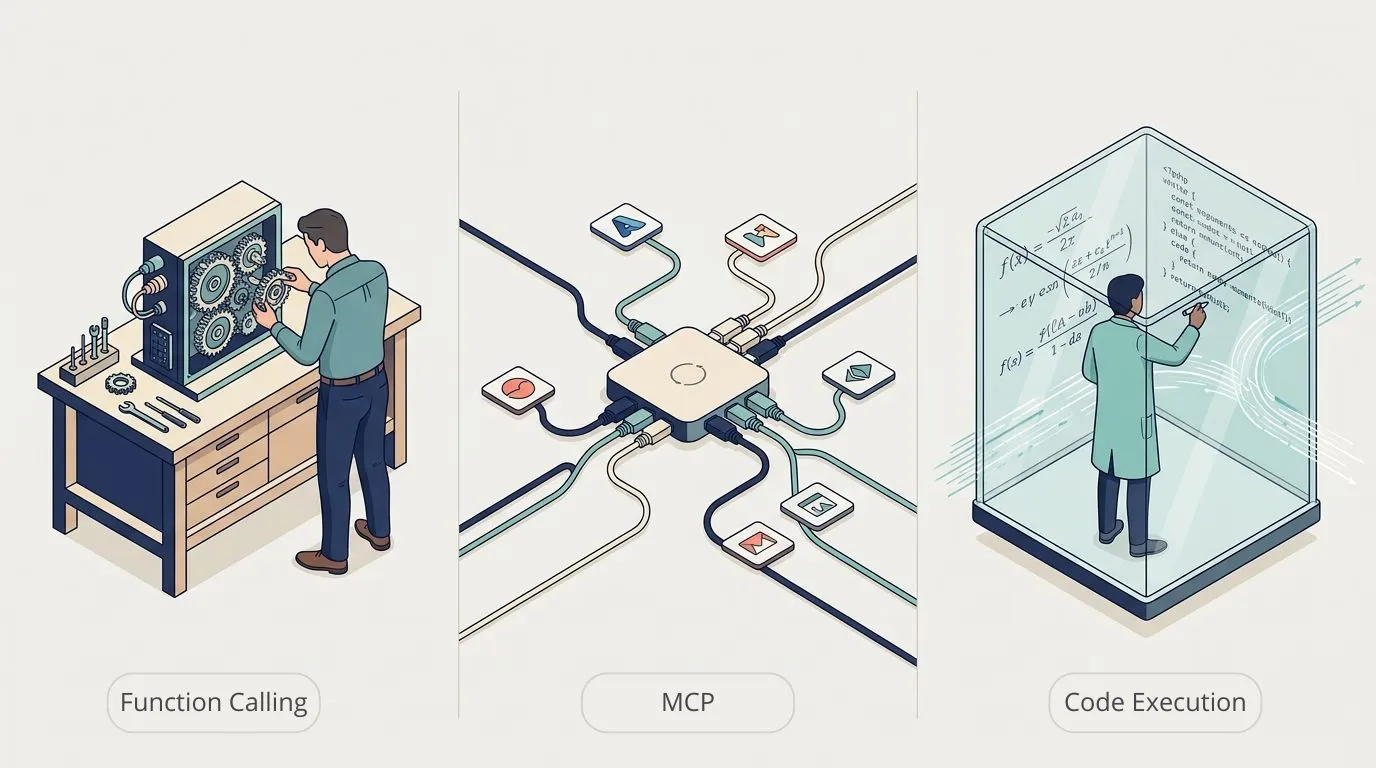
Five approaches have become established in practice. Three of them form the basis of most production architectures, two more are used less often but can be decisive in certain situations.
| Approach | How it works | Best for |
|---|---|---|
| Function calling | The team defines every permitted action, the model picks the one that fits the request | Clearly scoped applications with few functions |
| MCP | Standardised servers make tools available to many AI clients | Several AI applications using the same systems |
| Code execution | The model writes and runs code in a sandbox | Large, varied data tasks |
| API documentation | The model generates calls from an OpenAPI description | Quick integration within a single application |
| Computer use | The AI operates the user interface like a person | Legacy systems without interfaces, as a bridge |
Function calling
With function calling, the development team specifies which actions the AI may perform, such as retrieving an order status, looking up customer data or sending a report. Inputs, outputs, permissions and business rules are defined for each function. The model receives the list of available functions and decides during the conversation which one fits the request. Execution stays entirely under the application’s control.
Its biggest advantage is predictability: everything the AI can do has been defined, reviewed and implemented beforehand. That is why companies often choose function calling first. As long as the number of functions stays manageable, it is quick to build and easy to run. It works especially well for chatbots, internal assistants and closed applications where security, traceability and business rules matter more than maximum flexibility.
- Strengths: full control over every detail, easy to audit because all tools live in application code and go through normal code review, low latency, traceable decisions.
- Limits: every new integration is a development project of its own. Existing integrations for Slack, Notion or GitHub cannot be reused, and integration code written for one model provider does not always carry over to another.
Model Context Protocol (MCP)
MCP is best understood as a universal connection standard for AI applications. Just as USB connects devices to computers, MCP connects software to AI assistants in a uniform way. Anthropic introduced the standard in 2024, and OpenAI, Google and Microsoft now support it too. Vendors such as Slack, Notion, GitHub, SAP and Atlassian increasingly publish official MCP servers that different AI clients can use. MCP is thus becoming the shared integration standard of the AI world, much as REST APIs long were for conventional software.
MCP works in both directions:
- Ready-made MCP servers: the most common case. If the integration you need exists, it can often be connected within hours.
- Your own MCP servers: strategically more interesting. A company exposes its CRM, ERP or data warehouse once as an MCP server, and different AI applications such as Claude, Copilot or Cursor share it. In large organisations especially, this avoids duplicate work, because the same ERP integration is not rebuilt for every AI project.
MCP fits when several AI applications access the same systems or several teams build AI solutions in parallel, and when an official server already exists for a SaaS application. If you want to build integrations once and reuse them for a long time, a shared integration layer is the most future-proof foundation.
- Strengths: interoperability, a growing range of ready-made integrations, one integration for several AI clients, long-term architectural flexibility.
- Limits: higher operational complexity, a larger attack surface that requires deliberate security work, and uneven quality: official servers from major vendors are usually solid, many community projects still feel like prototypes.
Code execution
With code execution, the AI gets no predefined list of functions. Instead it receives a secure, isolated runtime in which it writes and runs code itself. This suits data-intensive, analytical tasks: evaluating large CSV files, processing extensive document collections, extracting and cleaning data from different sources or transforming complex tables. Rather than calling a separate tool for every step, the model generates the code it needs. The approach shines when the steps are too varied or dynamic for a fixed function list.
- Strengths: high flexibility, data does not have to pass through the model’s context, which keeps cost and latency in check, and the code can itself call functions or MCP servers.
- Limits: requires a secure sandbox, is harder to debug and needs a model that codes well. Today’s best models can, but it takes careful prompt engineering.
Connecting via API documentation
The AI receives an interface description, for example an OpenAPI specification, and generates the API calls itself. This suits quick integrations within a single application that has a clean API description. The approach is losing importance, though, because many companies now generate MCP servers directly from the same specifications.
Computer use
Here the AI operates the user interface directly, like a person: it clicks buttons, fills in forms and navigates through applications. This is slower and less reliable than integration via interfaces, but for legacy systems without a modern API it is sometimes the only option. In most companies, computer use is therefore a bridge until modernisation.
How to decide what fits best
Every sound architecture decision can be anchored in five criteria. None of them is purely technical, they concern usage, organisation and governance.
| Criterion | Points towards |
|---|---|
| Who uses it? | A single, clearly bounded application: function calling. Use from several AI clients such as Copilot, Claude or Cursor: MCP. |
| How many actions? | A few stable functions: function calling. Constantly new or growing interfaces: MCP or code execution, easier to maintain in the long run. |
| How much data? | Small, structured queries: any approach. Large data volumes: usually code execution. |
| What security requirements? | Strict audit and permission rules: often function calling. MCP is possible but then needs a clear governance layer for access rights. |
| Internal or external? | SaaS such as Salesforce, Slack, GitHub or Jira: often ready-made MCP servers. Internal systems such as CRM, ERP or data warehouse: function calling or your own MCP servers. |
This analysis rarely leads to a single right architecture. Usually the result is a combination, and that is exactly what modern AI systems look like.
Hybrid is the norm
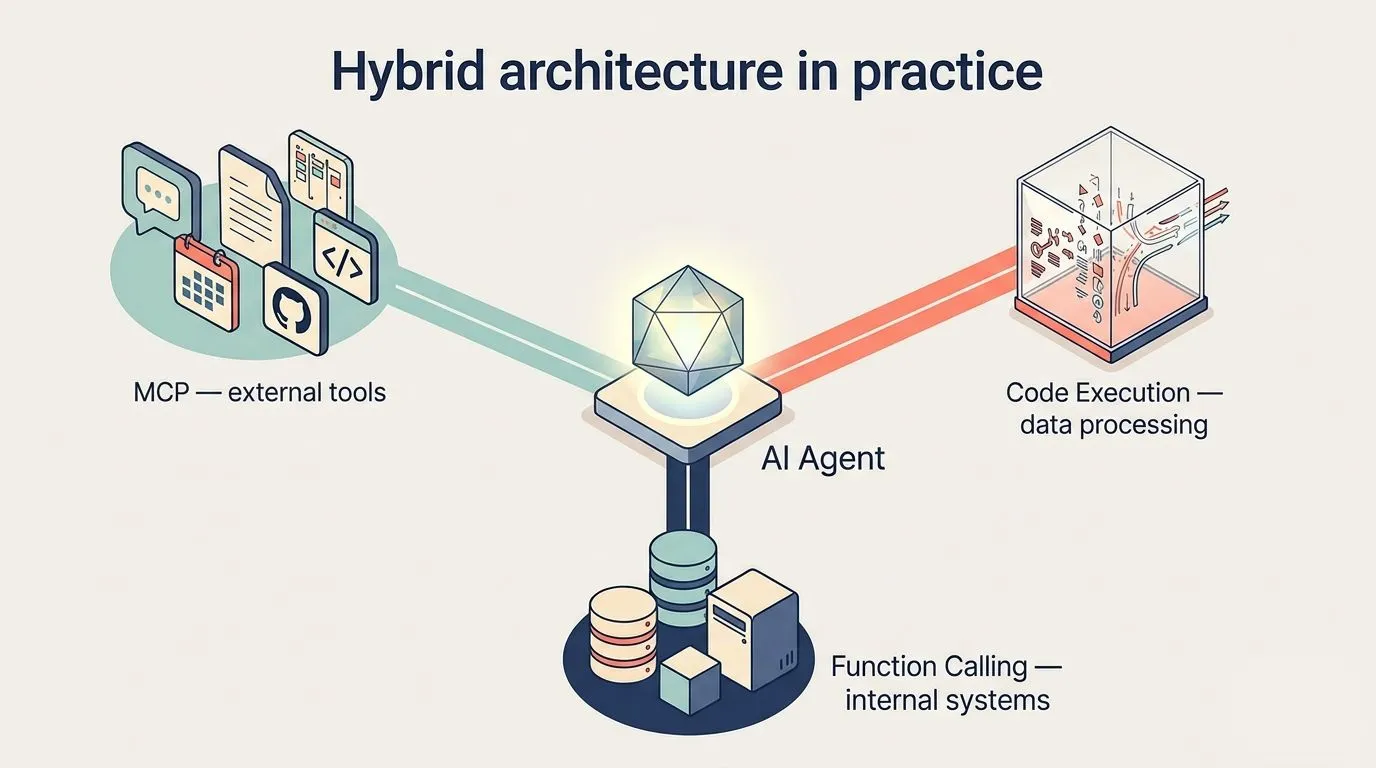
In 2026, mature enterprise AI architectures deliberately combine MCP and function calling and add code execution for large data volumes. A single AI agent often uses several integration layers at once, depending on the task and context.
A few guidelines follow from this:
- Start with the simplest solution that reliably solves the problem, and add complexity only when a concrete need arises.
- Design the architecture from the start so it can grow without rewriting existing integrations.
- Decide clearly how the agent calls tools, how they are authorised and how data flows through the system.
- Make every action observable: what was executed, when, on behalf of which user identity and with what result. This eases debugging and builds trust in production.
Function calling, MCP and code execution serve different purposes. Modern architectures combine all three.
What about security?
In the enterprise, security often decides whether an AI project happens at all. Security is a property of the whole architecture around the integration approach. MCP is not inherently less secure than function calling, it needs different safeguards. Each approach has its own risk profile and requires matching controls: clear responsibilities, traceable permissions, controlled tool calls and full transparency about which actions the AI performs and on what basis.
| Risk | What happens | Countermeasure |
|---|---|---|
| Prompt injection | The AI reads emails, documents or web pages with hidden instructions and treats them as legitimate commands. | Strictly separate user instructions from processed data and limit which actions are allowed after reading untrusted content. |
| Compromised plugins | A trusted plugin is tampered with or changed later and performs unexpected actions. | Use only trusted sources, pin versions, run critical integrations in-house. |
| Over-privileged AI | The AI has more rights than the person using it and reaches data it should not. | Enforce access controls in the application and pass the user identity to every tool call. |
| Data leakage via tool chains | Individual tools are harmless, but in combination they pass on sensitive information. | Define permitted tool combinations, restrict outbound destinations, separate agents by data sensitivity. |
| Unsafe AI-generated code | The AI writes code that contains errors or performs unintended actions. | Run code only in isolated sandboxes, restrict network and secrets access, no persistence between sessions. |
Risks always exist. What matters is whether they can be named clearly, assessed realistically and presented to the security team with a solid mitigation plan. Our article integrating AI into SAP, Microsoft 365 and Jira shows how permissions, human oversight and operating models fit together.
The right question first
Connecting AI to enterprise systems today means deliberately combining several approaches. Function calling, MCP and code execution form different layers of an architecture and each answers different requirements. The best implementations we have seen in recent months combine all three purposefully, depending on the organisation’s situation.
It starts with the business questions: who uses the system, which tasks should it take on, how often is it used, and under which organisational and security conditions? The technical architecture follows from that. The technology is available, the real work lies in asking these questions before implementation. Our AI agent development page shows how we build agents connected to enterprise systems. For software and IT companies themselves, the same is covered on AI for technology and IT.

Connecting AI to your systems?
In the process analysis we work out with you who uses the system, which actions it needs and which integration layers and security controls fit your landscape.
Request a process analysisFrequently asked questions
With function calling, the development team defines every action in the code of a single application. MCP is an open standard through which an integration built once can be used by many AI clients. Function calling offers maximum control, MCP offers reuse.
Not inherently. MCP needs different safeguards, such as a governance layer for access rights and vetted, version-pinned servers. Security depends on the whole architecture.
For large or varied data tasks, such as analysing CSV files or processing extensive document collections. The code runs in an isolated sandbox.
Strictly separate user instructions from processed content and limit which actions the AI may perform after reading untrusted content.
Aleksandra has been building custom AI solutions at theBlue.ai since 2021, with a focus on agentic implementations and local LLM deployments that precisely fit enterprise needs. As an AI Engineer, she helps organizations automate their processes with production-grade systems, from on-premise open-source models to RAG-based internal knowledge bases for regulated industries, and continuously expands her knowledge in the rapidly changing world of artificial intelligence.
In her articles, she shares practical experience from real enterprise AI projects and shows that deploying AI in companies doesn’t need to be complicated.